Features

Built for WordPress Teams Who Need Accessibility That Actually Works

We built Insi with features that make accessibility scanning and auditing understandable, fast, and seamlessly integrated into your WordPress workflow. Instead of overwhelming technical reports or confusing results, Insi provides clear insights and practical guidance that help you improve your website’s accessibility without becoming an expert yourself.
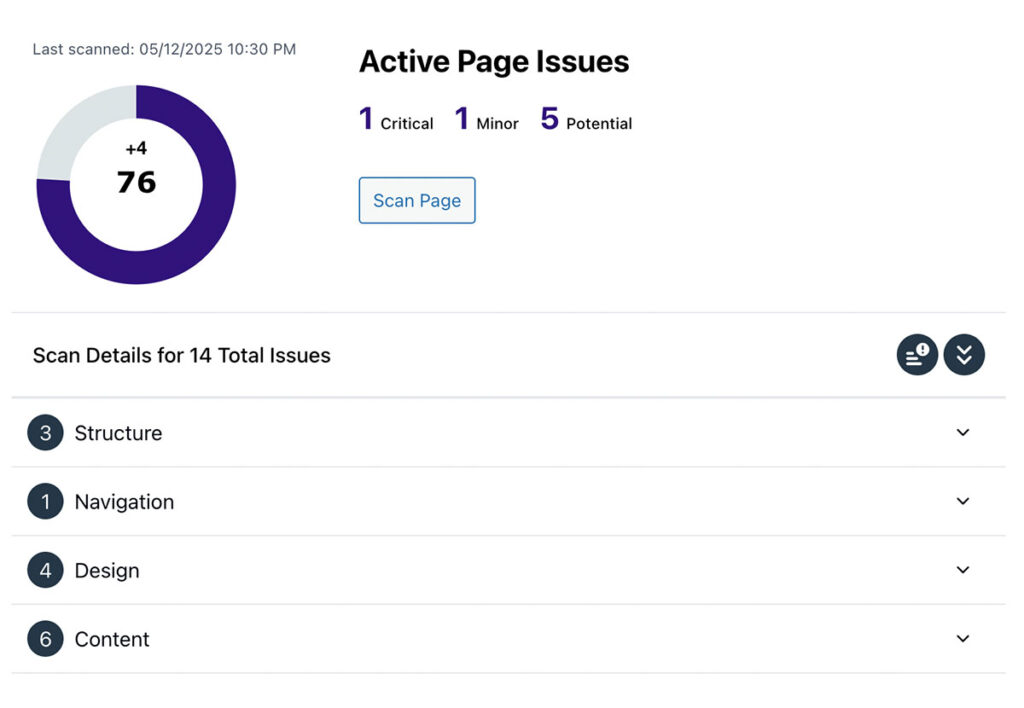
A screenshot of the Insi accessibility scan overview.

Scan All WordPress Content

Insi can scan pages, posts, events, products, and custom content on your WordPress site to identify accessibility issues. You don’t need to manually check each page or worry about missing important content—Insi handles the comprehensive scanning while you focus on your other work. This complete coverage ensures no accessibility problems slip through the cracks.
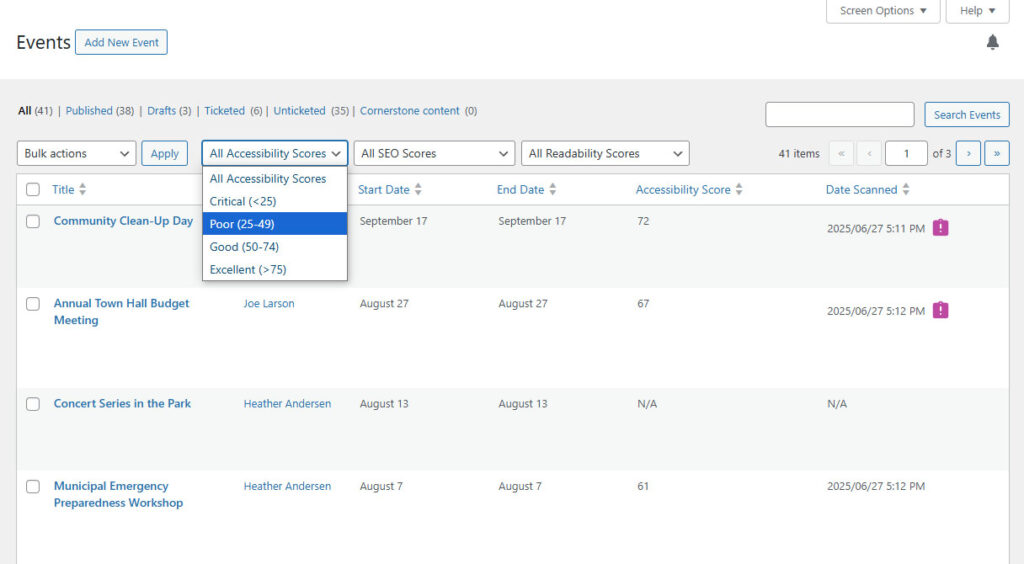
Screenshot of Insi integrated into events area of WordPress.

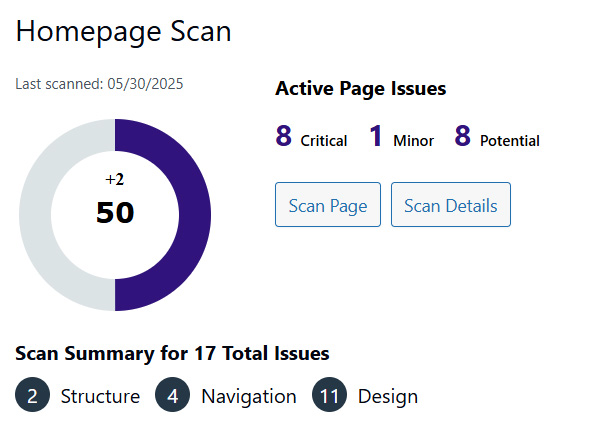
Screenshot of Insi page scan metrics.

Simple Overall Metrics and Scoring

Get a clear picture of your website’s accessibility health with easy-to-understand scores and metrics. Insi translates complex accessibility data into straightforward numbers that show your progress and help you communicate improvements to stakeholders. No confusing technical jargon—just clear indicators of where you stand.


Organized Issues List

All accessibility issues are presented in a logical, prioritized list that shows you exactly what needs attention. Insi automatically organizes problems by importance and type, so you can tackle the most critical issues first and work through improvements systematically. This organized approach prevents you from feeling overwhelmed by scattered problems.
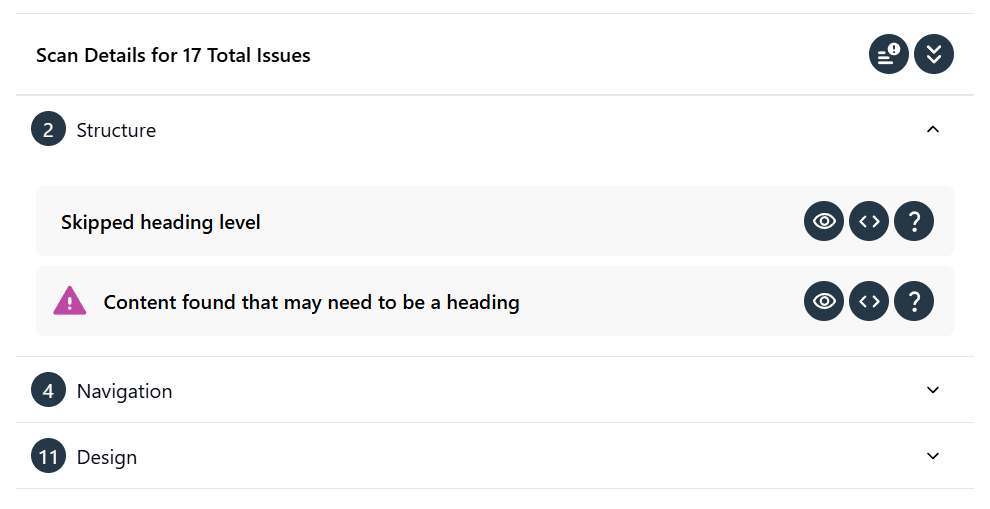
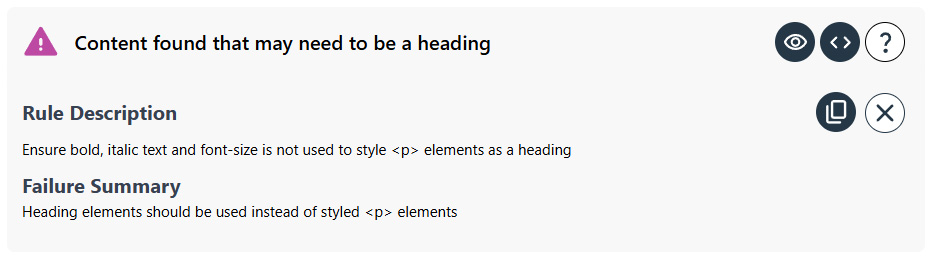
Screenshot of Insi issues detail list.

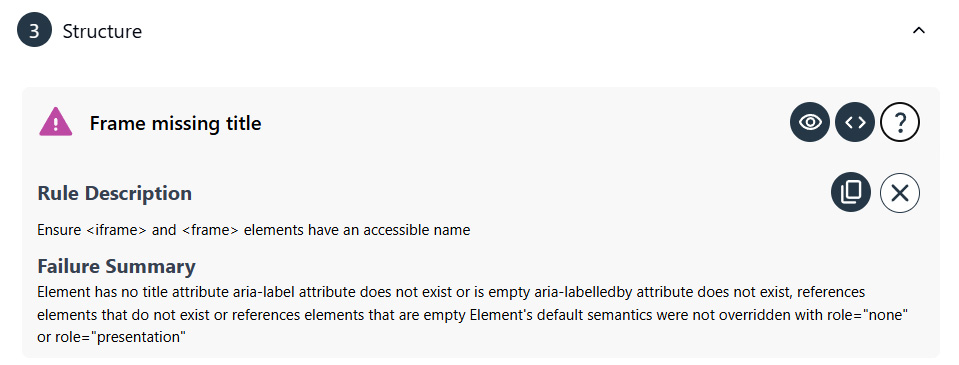
Screenshot of Insi accessibility issue explanation panel.

Complete Details For All Issues

Every accessibility issue includes clear explanations of what’s wrong, why it matters, and how to fix it. Insi provides the context you need to understand each problem and take appropriate action, ensuring you’re never left guessing about what needs to be done. This detailed guidance helps you make informed decisions about your accessibility improvements.


Visually Identify Issues

See exactly where accessibility problems occur on your pages with visual highlighting that pinpoints each issue location. Instead of trying to interpret technical descriptions, Insi shows you the actual elements that need attention directly on your website. This visual approach makes it easy to understand and address accessibility problems quickly.

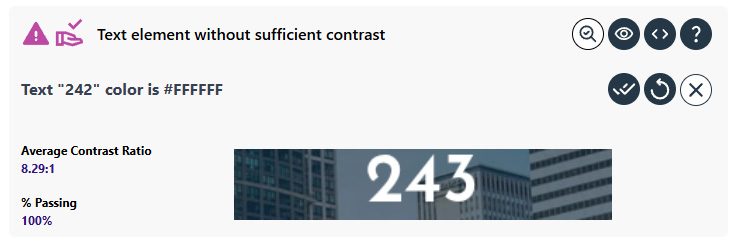
Screenshot of Insi highlighting contrast issue on website frontend.

Advanced Color Contrast Testing

Insi’s sophisticated color contrast analysis automatically identifies contrast issues while clearly showing you which color combinations pass accessibility standards. The testing handles complex scenarios that other tools miss, ensuring your website’s colors work for everyone. This advanced capability gives you confidence that your color choices meet accessibility requirements.


Built-In Issue Insights and Guides

Access helpful explanations and step-by-step guidance for resolving accessibility issues directly within Insi. You don’t need to search external resources or become an accessibility expert—Insi provides the knowledge you need right when you need it. This integrated support helps you learn while you improve your website.
Resolve Issues On Pages and Sitewide

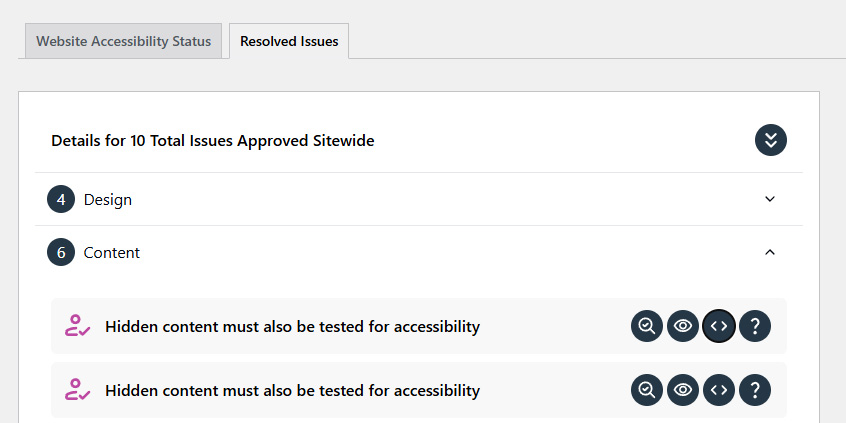
Mark accessibility problems resolved with tools that let you address issues individually or across your entire website. Manually approve and ignore issues that have been manually checked and keep track of all sitewide approved issues in one place. This flexible approach ensures you can resolve issues in the most effective way possible.


Deep WordPress Integration

Insi works seamlessly within your WordPress dashboard, integrating naturally with your existing workflow. You don’t need to learn new systems or switch between multiple tools—accessibility checking becomes part of your regular WordPress routine. This integration ensures accessibility improvements fit smoothly into how you already manage your website.
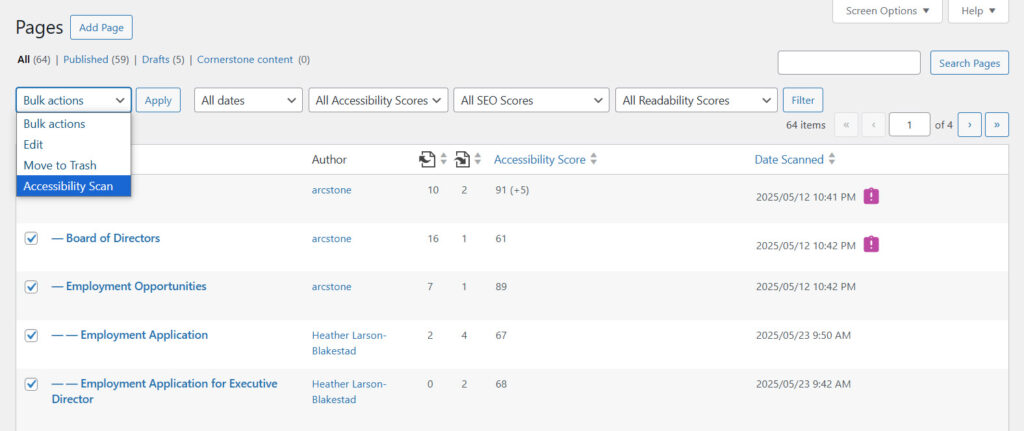
Screenshot of Insi WordPress integration showing bulk scanning from the page list.

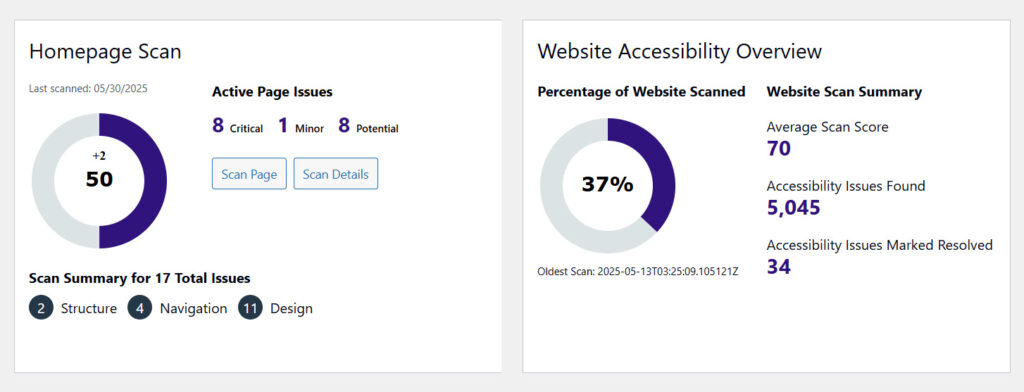
Screenshot of Insi dashboard metrics.

Dashboard With Site Metrics and Progress

Track your accessibility improvements over time with a clear dashboard that shows your progress and overall site health. Insi automatically monitors your advancement and provides regular updates on your accessibility status, making it easy to see the impact of your efforts. This ongoing tracking helps you maintain momentum and demonstrate continuous improvement.

Frequently Asked Questions

Insi uses virtual browser technology to scan your website the same way real users experience it. Instead of just analyzing code, Insi loads and renders each page completely—including all JavaScript, CSS, and dynamic content. This approach catches issues that code-only scanners miss, like interactive elements that fail during keyboard navigation or content that appears visually but remains hidden from screen readers. Each scan generates a detailed report with specific issues, their severity levels, and exactly where they appear on your pages.

Insi calculates an accessibility score from 0-100 based on the issues found during scanning. A score under 50 indicates very concerning accessibility barriers that likely prevent many users with disabilities from accessing your content effectively. Scores between 50-75 suggest your site is functional but needs improvement to meet compliance standards and provide good user experiences. Scores of 75 and above indicate excellent accessibility, though there’s always room for refinement. The score considers both the number and severity of issues found, giving you a quick way to assess your site’s overall accessibility health.

The Insi WordPress plugin works seamlessly within your WordPress backend, integrating naturally with your existing workflow. You can scan draft content before publishing, see accessibility data directly in your pages list, and use Insi in both the quick edit area and full page editing interface. This deep WordPress integration means you never need to leave your familiar content management system to check compliance or switch between external tools. The plugin connects to Insi’s cloud-based scanning infrastructure, so your site doesn’t need extra server resources to perform testing.

Yes, Insi can scan pages, posts, events, products, and custom content on WordPress sites to identify accessibility issues. This means whether you’re running a standard WordPress site, WooCommerce store, event calendar, or custom post types, Insi tests all your content types. The scanner understands WordPress architecture and recognizes how different content types render, ensuring comprehensive coverage across your entire site. This flexibility is especially valuable for complex WordPress sites using various plugins and custom functionality.

Every accessibility issue includes clear explanations of what’s wrong, why it matters, and how to fix it. Insi automatically organizes problems by importance and type in a logical, prioritized list that shows exactly what needs attention. For each issue, you get rule violation details, resolution instructions, the relevant code snippet, a visual preview showing where the problem appears, and the exact location on the website frontend. This complete detail approach means developers and content creators both understand the issues without needing deep accessibility expertise.

Insi shows exactly where accessibility problems occur on your pages with visual highlighting that pinpoints each issue location. Rather than just listing problems in text, Insi displays your pages with issues marked directly on them. This visual-first approach makes accessibility understandable for non-experts—you can see the problematic button, image, or text element rather than trying to interpret technical descriptions. There’s no complicated code interpretation or guesswork involved; your team can easily see and understand exactly what needs fixing.

Insi’s sophisticated color contrast analysis automatically identifies contrast issues while clearly showing which color combinations pass accessibility standards. A visual preview is shown and contrast is correctly calculated even for text over images and complex page layouts. This advanced testing goes beyond simple background-to-text checks, analyzing real-world scenarios where text overlays images or sits on gradient backgrounds. Visual indicators show exact contrast ratios and calculates contrast for each pixel of text.

Yes, the Insi dashboard provides site metrics and progress tracking that shows your accessibility improvements over time with clear visualizations of your overall site health. You can see total number of issues found, percentage of site scanned, average scan score, and more metrics that demonstrate your compliance journey. This progress tracking is valuable for demonstrating to stakeholders, maintaining accountability for accessibility goals, and understanding the impact of remediation work. Score differential data provides clear evidence of continuous improvement efforts.

Insi provides tools that let you mark potential accessibility problems resolved, addressing issues individually or across your entire website. You can manually approve and ignore some issues that have been checked, and keep track of all sitewide approved issues in one central location. This resolution tracking ensures you don’t waste time re-checking problems you’ve already addressed and helps manage accessibility work across large sites with recurring patterns. The system remembers your decisions so approved issues don’t keep appearing in new scans.

Yes, Insi allows you to test draft content for accessibility issues before it goes live on your site. This preventive approach means you can identify and fix accessibility problems during the content creation process rather than discovering them after publication. Scanning draft content is especially valuable for organizations publishing frequently, as it prevents accessibility issues from accumulating and ensures every new piece of content meets standards from day one. This workflow integration makes accessibility a natural part of content creation rather than a separate cleanup task.

Absolutely. Insi translates complex accessibility data into straightforward numbers that show your progress without requiring technical expertise to interpret. The dashboard presents accessibility information in clear language with visual indicators, making it accessible to content editors, project managers, and stakeholders who may not understand WCAG technical criteria. This approach empowers entire teams to participate in accessibility improvements rather than relying solely on developers to understand and communicate status.

Insi can scan multiple pages simultaneously, which is essential for larger WordPress sites where testing pages one-by-one would be impractical. Bulk scanning capabilities mean you can check dozens or hundreds of pages in a single operation, understanding the full scope of accessibility work needed across your entire web presence. This efficiency is particularly valuable during initial site audits or when rolling out major theme or plugin updates that could affect accessibility across many pages at once.

Complete Feature Set, No Upgrades Required

Every version of Insi includes the full feature set with all future updates included in your subscription. We work closely with our customers to develop features that people actually want and will use to improve their websites’ accessibility. Our commitment is to provide tools that make real differences in your accessibility efforts, not to create upgrade pressure or feature limitations that get in your way.