Insi 2.0 Is Here: A Faster, Smarter WordPress Accessibility Scanner
Accessibility work is never really “done.” Sites grow, content changes, designers push new layouts, and every one of those updates is a chance for a new barrier to sneak in. That’s exactly why we built Insi, and Insi 2.0 brings even more features to help your team keep your site accessible, efficiently.
Insi 2.0 is our biggest release yet. It’s dramatically faster, it keeps your scans current automatically, and it gives your whole team a clearer, more collaborative view of where your site stands on accessibility. Whether you’re auditing an existing site, fixing up an older one, or building something brand new, Insi 2 is designed to help you move faster and stay compliant with a lot less manual effort.
Here’s everything that’s new.
A Faster, More Reliable Foundation
The headline improvement in Insi 2.0 is one you’ll feel every time you open the plugin: it’s significantly faster.
We retooled Insi to rely much less on WordPress’s existing database structure. Without getting too far into the weeds, this means Insi now stores and retrieves your scan data far more efficiently. The result is a big jump in performance and speed across the board — the dashboard loads quicker, scans process faster, and the whole experience feels lighter, even on large, busy sites.
We also solved one of the most frustrating parts of building and launching a WordPress site: moving from a development environment to production. In the past, changing your site’s URL could leave your accessibility history behind. Now, Insi gracefully handles that transition. It automatically detects when your site’s URL changes and moves all of your existing scan data over to the new site for you. No lost history, no re-scanning everything from scratch, no manual cleanup. You just launch, and Insi keeps up.
For agencies and teams who regularly build on staging environments before going live, this alone is a huge time-saver.
A New Settings Page That Puts You in Control
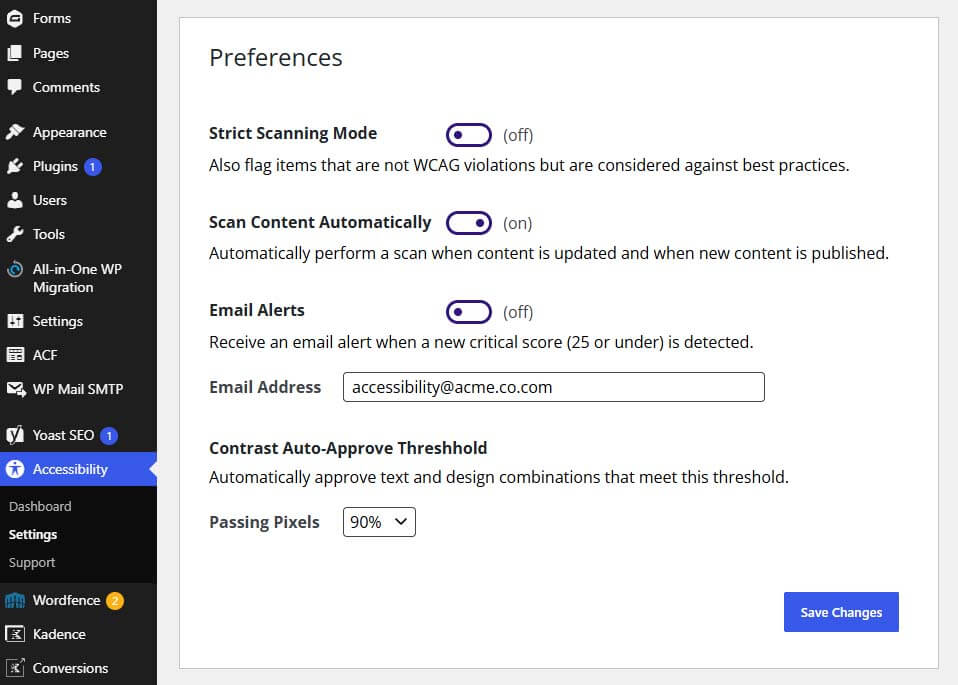
Insi 2.0 introduces a redesigned settings page with a handful of powerful new options. Each one is a simple on/off toggle or dropdown, but together they let you tune Insi to match exactly how your team works.
Strict Scanning Mode. When you turn this on, Insi goes beyond the official WCAG rules and also flags items that aren’t technically violations but are considered against accessibility best practices — like skipped heading levels, for example. It’s perfect for teams who want to hold themselves to a higher standard than the bare minimum.
Scan Content Automatically. This is the setting that keeps your scans from ever falling behind. When it’s on, a draft page is automatically scanned the moment it’s published, and any existing published content is re-scanned every time you make an update. In other words, your accessibility data always reflects the latest content and design on your site — no remembering to hit “scan,” ever.
Email Alerts. Turn this on to get an email the moment a new critical score (25 or under) is detected on your site. It’s a simple way to catch serious accessibility regressions right away, instead of discovering them weeks later. Just add the email address you want alerts sent to.
Contrast Auto-Approve Threshold. Color contrast gets tricky when text sits on top of images, video, or overlapping elements. When Insi detects this, it takes a screen capture and measures how much of the text actually passes contrast requirements. This new setting lets you decide how much needs to pass before Insi automatically approves it — anywhere from 75% to 100%. Set it strict, set it lenient, or land somewhere in between; the choice is yours.
A Redesigned Dashboard Built for Sites of Any Size
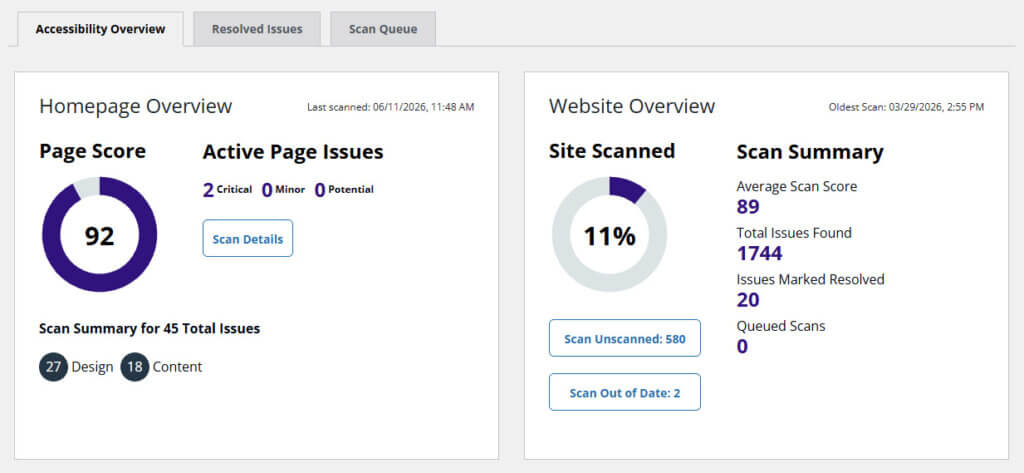
Your dashboard is home base — it’s the first thing you see and the fastest way to understand your site’s accessibility health at a glance. In 2.0, we made it faster and far more actionable.
First, speed. The dashboard now loads much faster for very large sites — even ones with tens of thousands of pages. If you’ve ever watched a dashboard crawl on a big site, you’ll appreciate this immediately.
Second, we added two smart shortcuts to the Website Overview. You’ll now see buttons that tell you exactly how many pages on your site haven’t been scanned yet and how many scans are out of date. Better still, you can click either button to instantly send all of those pages to the scan queue. Finding and closing your coverage gaps used to take real effort — now it’s two clicks.
Meet the New Scan Queue Tab
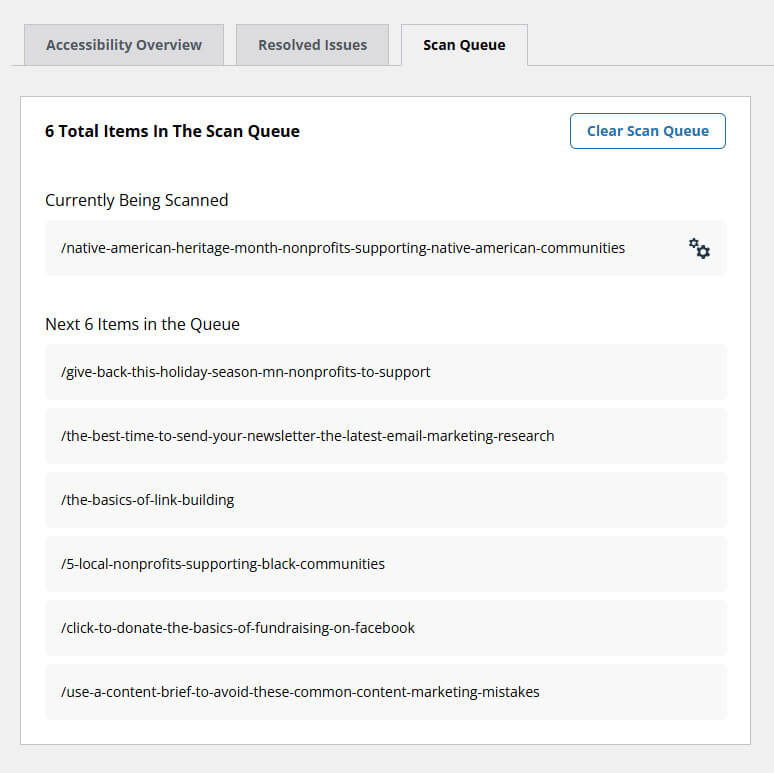
We also added a brand-new Scan Queue tab to the dashboard. It shows you exactly what Insi is scanning right now, plus everything else waiting in line. You get a live view of what’s currently being scanned and a list of the next items in the queue.
This is a game-changer for teams working on large sites together. When multiple people are triggering scans, everyone can see what’s already in progress and what’s coming up next — no duplicated effort, no wondering whether a scan is running. It brings a little order and transparency to what used to happen invisibly in the background.
A Better Scan Interface for the Work You Do Most
The scan interface is where you spend the majority of your time — reviewing issues, tracking progress, and deciding what to fix next. We gave it several upgrades to make that work faster and more collaborative.
See your progress over time. There’s a new button that graphs your scores and issue counts across every scan. Instead of guessing whether things are getting better, you can watch your pages actually improve, scan by scan. It’s motivating, and it’s great for showing stakeholders or clients the impact of the work.
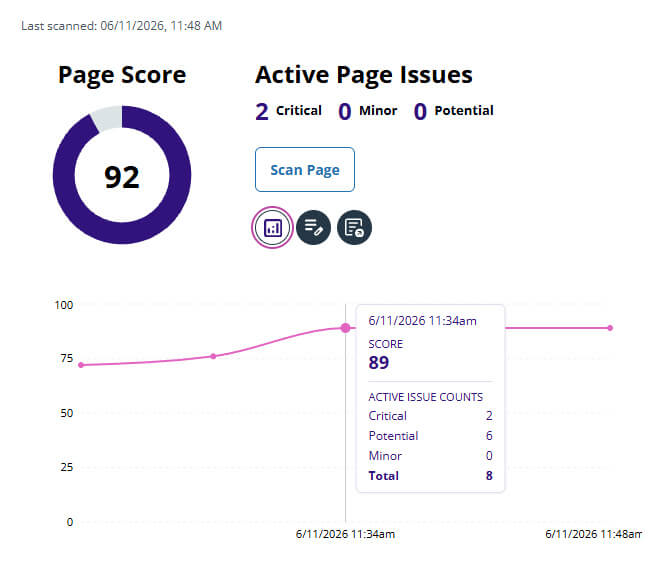
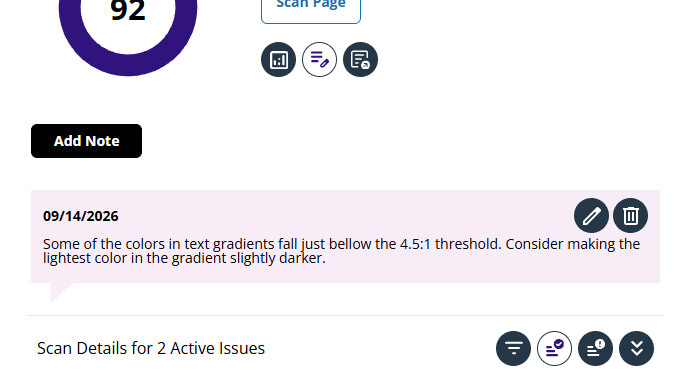
Leave notes your whole team can see. A new notes button lets you add notes that everyone can see. You might drop a note for your developer letting them know a specific plugin is causing an issue on a page, or flag context that the next person reviewing needs. It keeps important knowledge attached to the page it belongs to, instead of buried in a chat thread or email.
Export your full history. Need the data outside of Insi? A new download button lets you export all of your historical scan data as a CSV report, complete with score and issue-count history for the page — perfect for reporting, audits, or your own analysis.
Filter issues by who’s affected. In the issue detail list, you can now filter your issues by the types of users affected — things like visually impaired users, screen reader users, low vision users, and more. It’s a powerful way to prioritize the barriers that matter most to the audiences you care about.
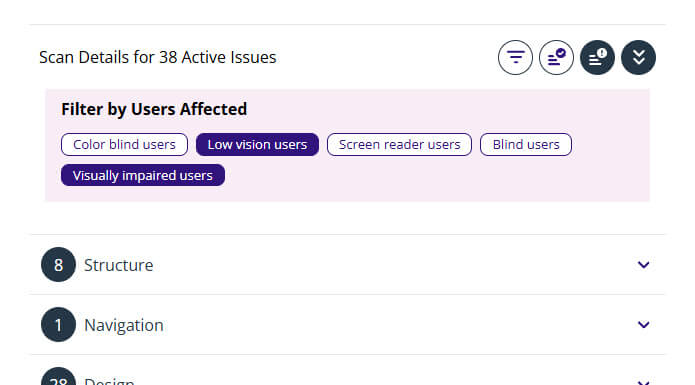
Zero in on what’s critical. There’s also a new filter to narrow the entire issue list down to only the critical issues. When you need to triage fast and tackle the most serious problems first, it’s one click away.
Why This Matters Right Now
Every one of these improvements adds up to the same thing: less time wrestling with your tools, and more time actually improving accessibility. Insi 2.0 speeds up auditing existing sites, fixing up older ones, and building new sites the right way from the start.
That speed matters more than ever. For organizations working against compliance deadlines — including nonprofits and government entities with firm dates to meet — automated, always-current scanning is the difference between scrambling at the last minute and staying confidently ahead of the curve.
Get Insi 2.0
Already using Insi? Head into your WordPress plugins area and make sure you’re updated to the latest version. If you have automatic updates enabled, you may already be running it — but it’s worth a quick check to be sure you’ve got all of these new features.
Try Insi for yourself — no install required
Curious what Insi actually catches? Experience Insi’s superior real-browser scanning firsthand, with nothing to install. Try the demo » and see how Insi scans a live page the way real users experience it.
Partners & agencies
Already building sites for clients? See how your agency can use Insi on client projects to save time, tighten your accessibility workflow, and deliver better results. Explore Insi for partners »

Nicholas Longtin
Nicholas Longtin is CEO and co-founder of Insi, the WordPress-native accessibility scanning platform built to close the gap between ineffective overlay tools and unaffordable enterprise solutions. With 26 years of web development experience, a DHS Trusted Tester certification, and a decade focused specifically on WordPress accessibility, Nick built Insi from real-world practice at ArcStone, where he continues to serve as Senior Strategist. He writes about accessible development, compliance strategy, and the business case for inclusive design.