Why Free Accessibility Tools May Cost You More Than You Think
When you’re just starting your accessibility journey, free tools seem like the obvious choice. Why pay for something when there are dozens of free accessibility scanners available online? It’s a logical assumption that most website teams make—but one that often leads to frustration, wasted time, and incomplete accessibility improvements.
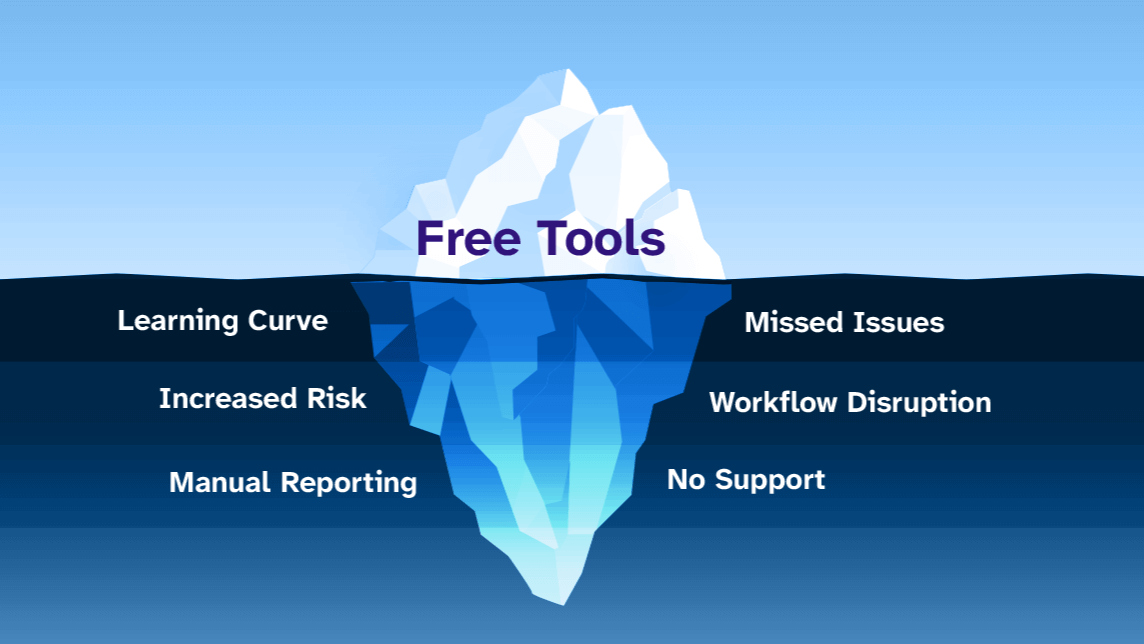
The truth is, while free accessibility tools don’t cost money upfront, they often carry hidden costs that can make your accessibility project far more expensive and time-consuming than necessary. Let’s explore why the “free” route might actually be costing you more in the long run.
Are Free Accessibility Tools Really Free?
The Hidden Time Investment
Free accessibility tools typically require significant time investment that isn’t immediately obvious. Most free scanners provide basic reports that require you to:
- Manually interpret complex technical jargon
- Research each issue individually to understand what it means
- Figure out how to actually fix the problems on your own
- Test and re-test to verify your fixes worked
- Repeat this process across multiple tools to get complete coverage
Industry reports show that teams using free tools spend 3-4 times longer on accessibility audits compared to those using integrated solutions. What seems like a money-saving approach quickly becomes a time-drain that pulls your team away from other critical projects.
The Learning Curve Challenge
Free tools assume you already understand accessibility principles, but most website teams are just beginning to learn. Without proper guidance, you’ll spend countless hours:
- Googling accessibility terminology and standards
- Watching tutorial videos to understand WCAG guidelines
- Joining forums to ask questions about specific issues
- Making mistakes and having to redo work
This educational overhead isn’t factored into the “free” equation, but it represents real costs in terms of team productivity and project timelines.
The Context-Switching Problem
One of the biggest hidden costs of free accessibility tools is workflow disruption. Here’s what typically happens:
- You work on your WordPress site
- You copy the URL to a free scanning tool
- You wait for the scan to complete
- You review results in a separate interface
- You switch back to WordPress to make changes
- You return to the scanner to verify fixes
- You repeat this cycle dozens of times
This constant context-switching doesn’t just waste time—it breaks your creative flow and makes it harder to understand how accessibility improvements fit into your overall site design.
The Integration Gap
Free tools exist outside your WordPress environment, which creates several problems:
- No real-time feedback: You can’t see accessibility issues while you’re actively editing content
- Delayed validation: You have to save, publish, then scan to see if your changes worked
- Disconnect from content: Issues are reported separately from where you actually make edits
- Version confusion: You might be scanning an outdated version of your page
Professional accessibility tools that integrate directly into WordPress allow you to identify and fix issues within your existing workflow. This integration alone can save hours of switching between tools and interfaces.
What Do Free Tools Actually Miss in Their Scanning?
The Limitations of Basic Code Analysis
Most free accessibility scanners use simple code analysis—they look at your HTML and CSS to identify obvious problems. While this catches some issues, it misses many real-world accessibility barriers that only become apparent when someone actually tries to use your site.
Here’s what basic code scanning typically misses:
- Dynamic content issues: Problems that only appear when users interact with forms, menus, or other interactive elements
- Visual context problems: Issues with color contrast that depend on actual rendering, not just code values
- User experience barriers: Navigation problems that are obvious to real users but invisible to code analysis
- Screen reader compatibility: Issues that only surface when content is actually read aloud by assistive technology
The Virtual Browser Technology Advantage
Insi uses virtual browser technology that actually renders your pages and simulates real user interactions. This approach identifies significantly more issues because it:
- Tests how your site actually behaves, not just how it’s coded
- Renders real user presentations of forms, buttons, and navigation
- Evaluates visual elements as they appear to users
- Checks compatibility with assistive technologies
Industry studies show that virtual browser scanning identifies 40-60% more accessibility issues than basic code analysis alone. This means free tools are leaving substantial problems undetected on your site.
How Can You Make Smarter Accessibility Tool Choices?
Evaluate the True Cost
Before choosing any accessibility tool, calculate the real investment:
- Time cost: Hours spent learning, scanning, interpreting, and fixing
- Opportunity cost: Other projects delayed while you focus on accessibility
- Quality cost: Issues missed by inadequate scanning
- Compliance risk: Legal exposure from incomplete accessibility coverage
When you factor in these hidden costs, professional accessibility tools often provide better value than free alternatives.
Look for WordPress Integration
If you’re managing a WordPress site, prioritize tools that work within your existing workflow:
- In-dashboard scanning: See accessibility issues while you’re editing content
- Custom content scanning: Review your entire site, not just pages and blogs
- Contextual guidance: Receive fix instructions right where you’re working
- Automated monitoring: Ongoing scans without manual intervention
Prioritize Learning Support
Choose tools that help you build accessibility knowledge, not just identify problems:
- Clear explanations: Plain English descriptions of what each issue means
- Fix guidance: Step-by-step instructions for resolving problems
- Educational resources: Access to training materials and expert support
- Progress tracking: Visibility into your accessibility improvements over time
Taking Action: Your Next Steps
Now that you understand the hidden costs of free accessibility tools, here are your actionable next steps:
- Audit your current approach: Calculate how much time you’re actually spending on accessibility with free tools
- Test tool integration: Try a professional tool to compare the workflow experience
- Measure scanning accuracy: Compare what free tools find versus more comprehensive scanning
- Consider long-term value: Factor in time savings and improved accuracy when evaluating costs
The goal isn’t just to scan for accessibility issues—it’s to create genuinely accessible websites efficiently. While free tools might seem appealing initially, they often create more work and miss critical problems that could impact your users and your compliance efforts.
Get Expert Guidance
If you’re feeling overwhelmed by accessibility requirements or unsure whether your current approach is sufficient, contact our accessibility experts for personalized guidance. Our team can review your site, explain your options, and help you choose the most efficient path forward.
Ready for a comprehensive accessibility evaluation? Schedule an Insi-powered audit to get a complete picture of your site’s accessibility status and a roadmap for improvements. Our audit combines advanced scanning technology with expert analysis to give you confidence in your accessibility approach.