Your First Website Accessibility Audit: A Beginner’s Guide
If you’ve never audited your WordPress website for accessibility, you’re not alone. Many website owners and webmasters feel overwhelmed by the technical complexity of accessibility standards, unsure where to start, or confused by conflicting advice about quick fixes and automated solutions.
The truth is, conducting your first website accessibility audit doesn’t have to be intimidating. With a systematic approach and the right understanding of what actually works (and what doesn’t), you can begin making your WordPress site more accessible to all users.
Why Your WordPress Site Needs an Accessibility Audit Right Now
Website accessibility isn’t optional—it’s essential for reaching your full audience and protecting your organization. Yet many site owners rely on misconceptions that can actually harm their accessibility efforts.
The overlay trap: Many websites install accessibility overlay widgets believing they solve accessibility problems instantly. These overlays create a false sense of security while often making sites harder to use for people with disabilities. Real accessibility improvements happen in your site’s code and content, not through band-aid solutions that sit on top of your existing problems.
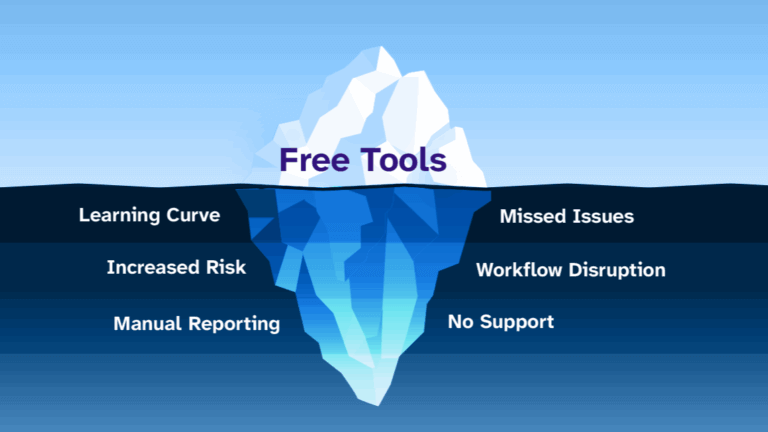
The free tool limitation: Browser-based accessibility checkers and free online scanners only catch surface-level issues—often missing 60-70% of actual accessibility barriers. While these tools provide a starting point, they can’t simulate how real users with assistive technologies experience your site.
This is why a proper accessibility audit requires a systematic approach that goes beyond quick scans and overlay solutions.
Where to Start: Your Homepage is Your Foundation
1. Begin with Your Most Important Page
Your homepage receives the most traffic and creates first impressions for all visitors. Starting here gives you the biggest impact for your initial accessibility improvements.
Follow this systematic approach:
- Navigate your homepage using only your keyboard (no mouse)
- Check that all interactive elements can be reached and activated
- Verify that focus indicators are visible as you tab through the page
- Test that you can access and close any menus or pop-ups
2. Evaluate Your Homepage Content Structure
Proper content structure helps screen readers and other assistive technologies understand your page hierarchy:
- Confirm your page has only one H1 heading
- Check that headings follow logical order (H1, then H2, then H3)
- Verify all images have meaningful alt text
- Ensure links have descriptive text (avoid “click here” or “read more”)
3. Test Your Homepage Color Contrast
Poor color contrast makes content unreadable for users with visual impairments:
- Check text against background colors
- Verify button and link colors meet contrast standards
- Test that important information isn’t conveyed by color alone
Starting with your homepage establishes your baseline accessibility level and helps you understand the scope of improvements needed across your entire site.
The Plugin Problem: Why You Must Vet Every WordPress Plugin
WordPress plugins can introduce accessibility barriers faster than you can fix them. Many popular plugins create navigation traps, missing labels, or keyboard accessibility problems that affect your entire site.
How to Audit Your Current Plugins
- List all active plugins on your site
- Test each plugin’s public-facing features with keyboard navigation
- Check that plugin-generated forms have proper labels
- Verify plugin pop-ups and modals can be closed with the Escape key
- Test that plugin content works with screen readers
Red Flags to Watch For
Remove or replace plugins that create these common accessibility problems:
- Contact forms without proper field labels
- Image galleries that can’t be navigated with keyboards
- Pop-ups that trap keyboard focus
- Sliders that auto-advance without user control
- Social media widgets that aren’t keyboard accessible
Before Installing New Plugins
Research accessibility before adding any new functionality:
- Check the plugin’s accessibility statement or documentation
- Look for recent updates and active support
- Test the plugin on a staging site before going live
- Verify it doesn’t conflict with your existing accessibility improvements
Poor plugin choices can undo months of accessibility work, making this one of the most critical aspects of maintaining an accessible WordPress site.
When DIY Isn’t Enough: Recognizing the Need for Professional Help
Even with systematic auditing, many accessibility improvements require development expertise. Understanding when to seek professional help prevents frustration and ensures proper implementation.
Technical Issues That Need Developer Expertise
Some accessibility problems require code-level solutions:
- Custom theme modifications for proper heading structure
- ARIA label implementation for complex interactive elements
- Keyboard navigation fixes for custom functionality
- Database content updates for missing alt text across hundreds of images
- CSS modifications for color contrast compliance
Signs You Need Professional Accessibility Support
Consider professional help when you encounter:
- Issues that keep recurring after you think you’ve fixed them
- Technical solutions that require modifying theme files
- Complex interactive elements like custom forms or calculators
- Large-scale content updates across multiple pages
- Integration challenges with third-party services
What Professional Accessibility Auditing Provides
Unlike free browser tools or overlay solutions, professional accessibility auditing offers comprehensive evaluation that considers real user experiences. Professional audits identify issues that automated tools miss and provide implementation guidance for lasting improvements.
Rather than paying enterprise-level prices for accessibility solutions, many WordPress site owners find that targeted professional support combined with the right tools provides the most cost-effective path to accessibility compliance.
If you’re ready to move beyond basic browser tools and get a complete picture of your site’s accessibility, consider scheduling a professional accessibility audit that can identify issues across your entire WordPress site and provide clear guidance for systematic improvements.
Your Accessibility Audit Action Checklist
Use this checklist to conduct your first systematic accessibility audit:
Immediate Actions (This Week)
- Test your homepage with keyboard-only navigation
- Check your homepage heading structure (H1, H2, H3 order)
- Verify all homepage images have alt text
- List all active plugins on your site
Short-term Goals (This Month)
- Test each plugin for keyboard accessibility
- Audit your top 5 most-visited pages using the same homepage process
- Check color contrast on key pages
- Create a list of issues that need developer assistance
Ongoing Maintenance (Monthly)
- Test new content before publishing
- Review plugin updates for accessibility impacts
- Monitor user feedback about site usability
- Track your accessibility improvements over time
When You’re Ready for Comprehensive Analysis
- Schedule a professional accessibility audit for complete site evaluation
- Implement systematic scanning to catch issues before they affect users
Moving Beyond Basic Tools: Building Long-term Accessibility Success
Your first accessibility audit is just the beginning. Sustainable accessibility requires ongoing attention, systematic evaluation, and tools that can keep up with your content updates and site changes.
Free browser tools and accessibility overlays can’t provide the comprehensive analysis needed for WordPress sites that regularly publish new content, update plugins, or modify functionality. Professional-grade accessibility tools offer the systematic approach and detailed guidance that growing websites need.
Ready to take your accessibility efforts to the next level? Our accessibility experts can help you identify issues across your entire WordPress site and provide clear implementation guidance. Schedule your comprehensive accessibility audit to get started with professional-grade accessibility analysis.
Want to stay updated on accessibility best practices and WordPress-specific guidance? Subscribe to our newsletter for regular tips and insights that help you maintain and improve your site’s accessibility over time.
Remember: accessibility is a journey, not a destination. Starting with systematic auditing puts you on the path toward creating a website that truly works for everyone.